
Converting
Subtitles
The Subtitles section burns one subtitle track into the picture. Burned subtitles are part of the video, so every player shows them, at screen depth in both eyes.
Burn-in
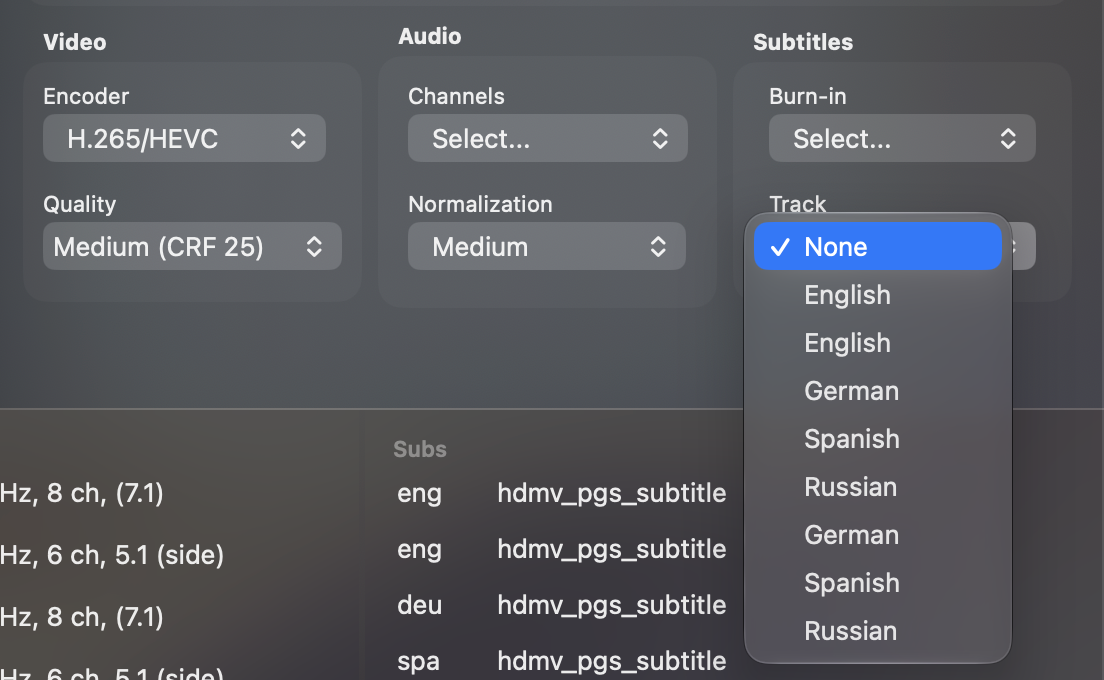
None burns nothing in, and is the default. Select… opens a Track menu with every subtitle track on the disc, listed by language. The Subs list in the bottom panel shows the same tracks with their format.
Forced subtitles
A forced track covers only the lines spoken in another language than the movie's own, the way the disc shows them in a player. When the movie has one, a Forced choice appears under Burn-in and is selected for you. Choose None to leave it out.
What is burned
Blu-ray subtitles are images, and MakeSBS3D draws them into the frame where the disc places them, the same in the left and the right view. A player's own subtitle switch has nothing to turn off afterwards, so burn in only the track you will watch with.