
MakeSBS3D
Give Your 3D Movies New Life
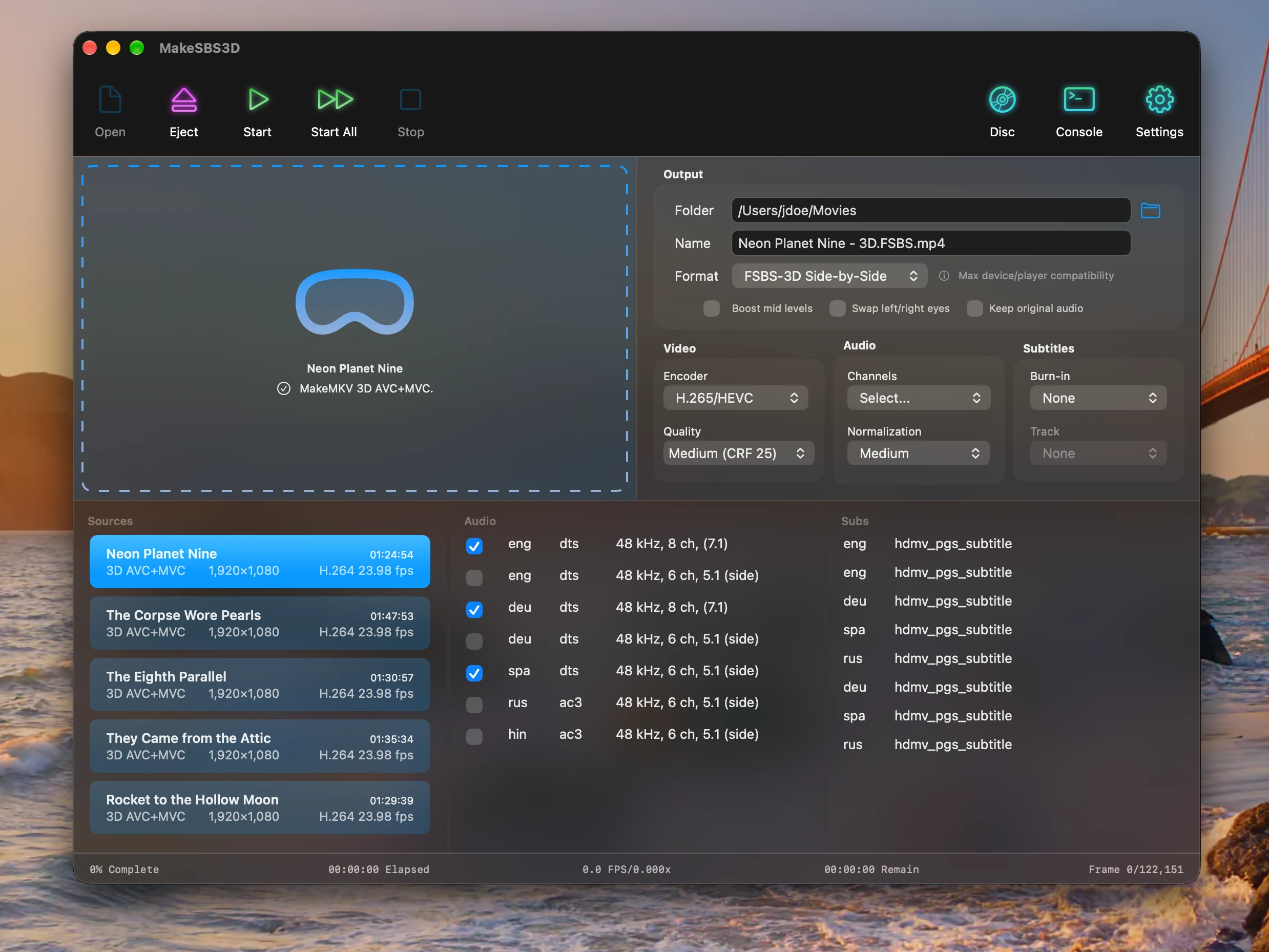
MakeSBS3D is a native macOS app for converting MakeMKV AVC+MVC files, or your 3D Blu-rays straight from the drive, into Full Side-by-Side 3D or Spatial Video formats for 3D viewing in Apple Vision Pro or Meta Quest using SKYBOX, Moon VR Player, or other 3D media players.
The free trial converts the first 5 minutes of each movie. A one-time purchase unlocks full-length conversion.
Apple Silicon Mac, macOS 15.6 or later
Features
MakeSBS3D reads the 3D video, audio, and subtitle tracks of your MKV or Blu-ray and writes a file your headset can play.
-
Two 3D formats
Full Side-by-Side 3D for the widest player support, or MV-HEVC Spatial Video for Apple Vision Pro.
-
H.265 or H.264
Six quality presets, or a CRF value of your own.
-
Audio your way
Keep every track, pick the ones you want, or pass the original audio through untouched. Loudness normalization in three strengths.
-
Subtitle burn-in
Burn a subtitle track into the picture. Forced tracks are picked up automatically.
-
Batch conversion
Queue several movies and convert them in one go, each with its own settings.
-
Picture controls
Boost mid levels, and swap the left and right eyes when a disc has them reversed.
-
Direct from disc
With MakeMKV installed, the Disc button lists the 3D titles on the Blu-ray in the drive. MakeMKV extracts, MakeSBS3D converts, and the disc is ejected when done.
-
Six languages
English, German, Spanish, French, Italian, and Swedish, following your Mac or a choice of your own in Settings.
Frequently asked questions
-
What are the system requirements?
An Apple Silicon Mac running macOS 15.6 or later, with 100+ GB of free disk space.
-
Is there a manual?
Yes. The manual explains every control, page by page. The blog post How to Convert Your 3D Blu-rays for Watching on Apple Vision Pro walks through the process once.
-
Which files does MakeSBS3D convert?
MKV files made by MakeMKV from a 3D Blu-ray, with the AVC+MVC 3D video track included. With MakeMKV installed, also the 3D Blu-ray itself, a disc image or a BDMV folder.
-
Why does MakeSBS3D keep telling me that the MKV isn't valid?
If the disc is a 3D Blu-ray and you used MakeMKV to create the file, you most likely didn't check the checkbox to include the MPEG4 MVC track. The manual shows where it is under Extracting with MakeMKV.
-
Can MakeSBS3D read movies directly from Blu-rays?
Yes, with MakeMKV installed. Insert the disc and click Disc: MakeSBS3D lists its 3D titles, MakeMKV extracts the one you start, and MakeSBS3D converts it and ejects the disc.
-
Which output format should I pick?
Full Side-by-Side 3D plays in the most devices and players. Spatial Video is the native format of Apple Vision Pro.
-
How does it compare to players that play MVC directly?
Players such as CineUltra and 4XVR show the disc’s own MVC stream as it is. MakeSBS3D encodes it again to HEVC, which is lossy, and at Maximum (CRF 18) it is close to the source. What you get for it is a file that plays anywhere: Theater, SKYBOX, Bigscreen, Vision Pro as spatial video, and 3D TVs, with audio normalization, the mid-tone lift, and burned-in subtitles.
-
Is there a free trial?
Yes. Without a license, MakeSBS3D converts the first 5 minutes of each file, so you can check that your 3D movies convert correctly before you buy.
-
How do I unlock the full version?
Buy a license on Gumroad. The key comes with your receipt. In the app, choose MakeSBS3D → License… and enter it.
-
Can I use my license on more than one Mac?
Yes. A key is good for five activations. If you run out, write to support and the count is reset.
-
Can I get a refund?
Yes. Write to support within 14 days of buying and the purchase is refunded, no questions asked. The key stops working once it is refunded.
-
Is MakeSBS3D available for Windows?
No. MakeSBS3D was created out of need, since BD3D2MK3D exists for Windows but not for macOS.
Privacy Policy
Effective Date: October 5, 2026.
MakeSBS3D is developed and operated by Michael Edlund (“we,” “our,” or “us”). This Privacy Policy explains what information MakeSBS3D and this website handle, and who receives it.
1. Your Movies Stay on Your Mac
- MakeSBS3D converts your files on your Mac. Your movies, their names and their contents are never sent anywhere.
- The app contains no analytics, advertising, or tracking.
2. Software Updates
- MakeSBS3D checks makesbs3d.com for new versions and downloads them from there. You can turn the automatic check off in Settings.
- As with any web request, our server receives your IP address and the version of the app making the request. We use this only to deliver the update.
3. Purchases
- The full version is sold through Gumroad, which acts as the seller. Gumroad collects your email address, billing details and payment details. We never see your payment details.
- Gumroad shares your email address and order with us so we can help you with your purchase.
- Gumroad's handling of your data is described in its own privacy policy.
4. License Activation
- When you activate a license key, MakeSBS3D sends the key to Gumroad to check it.
- While a license is active, the app checks it with Gumroad at most once a day. That check contains the license key and nothing else about you or your Mac.
- The trial needs no license and does not contact Gumroad.
5. This Website
- This website counts visits with a self-hosted copy of Umami, which stores no cookies and no personal data. It uses no advertising or tracking cookies.
6. Children’s Privacy
MakeSBS3D is suitable for users of all ages and does not knowingly collect personal information from children under 13.
7. Your Rights
To see, correct, or delete the purchase information we hold about you, contact support@makesbs3d.com.
8. Changes to This Policy
We may update this Privacy Policy from time to time. The latest version will always be available at: https://makesbs3d.com/en#privacy