
Converting
Extracting with MakeMKV
MakeMKV copies the movie off the Blu-ray into an MKV file. For 3D the file has to carry the second eye, which MakeMKV leaves out unless you ask.
Ripping the disc
- Open MakeMKV and insert the 3D Blu-ray. MakeMKV scans the disc and lists its titles.
- Find the main movie, usually the largest title, and expand it with the small triangle next to it to see its tracks.
- Under Video, check the track that says Mpeg4 MVC.
- Choose an output folder and click Make MKV.
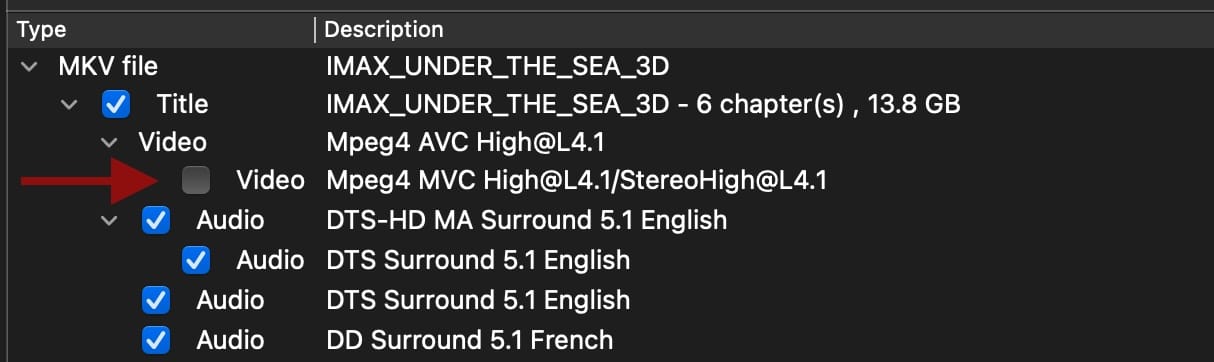
The MVC track is the 3D
MakeMKV does not check the Mpeg4 MVC track on its own. That track holds the second view of the movie, and without it MakeSBS3D reports "3D AVC+MVC track missing".
What you get
A rip takes up to an hour and gives one MKV with both views of the picture, the audio tracks and the subtitle tracks the disc carries. The file is large, a full movie runs 30 to 50 GB. MakeSBS3D reads it from wherever it is and writes the converted movie beside it, so keep that much room free there too.
With MakeMKV installed, MakeSBS3D can run this step itself and clean up the MKV afterwards. See Direct from disc.