
Converting
Output
The Output section names the file, picks where it goes and which 3D format it has, and holds the three picture and sound switches.
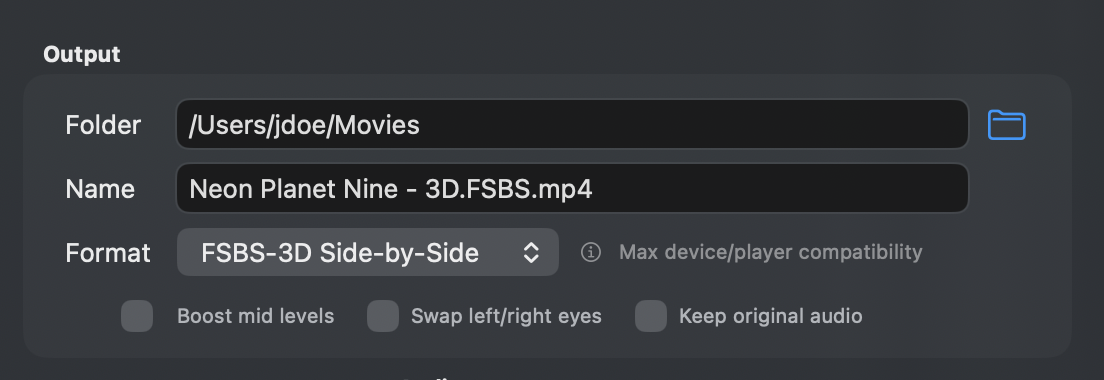
Folder and Name
Folder is where the converted movie is written. It starts as the folder holding the source, or the folder set under Settings → Defaults → Output. Type a path or click the folder icon to pick one.
Name is the file name. It starts as the movie's name, and MakeSBS3D adds the format tag and the extension: Movie - 3D.FSBS.mp4, Movie - 3D.HTAB.mp4, or Movie - 3D.MV-HEVC.mov. A file that already exists is kept, and the new one gets a number. In the trial the tag ends in _TRIAL.
Format
FSBS-3D Side-by-Side writes an MP4 with the left and right views next to each other at full width. It is the format most 3D players understand, including SKYBOX and Moon VR Player on Apple Vision Pro and Meta Quest. The conversion streams straight to the file, so it is faster than Spatial Video and uses less disk space. This is the default.
MV-HEVC Spatial Video writes a MOV in Apple's own 3D format, which Apple Vision Pro plays natively. MakeSBS3D first makes a Side-by-Side intermediate and then converts that, so it takes longer and needs temporary room for the intermediate.
Below the divider are three formats for 3D TVs, projectors, and players that take a frame no wider than 1920 pixels. Each writes an MP4 in one pass, like FSBS-3D Side-by-Side:
- HSBS-3D Half Side-by-Side squeezes each view to half width, side by side in a 1920×1080 frame, for 3D TVs and projectors. Tag
3D.HSBS. - HTAB-3D Half Top-and-Bottom squeezes each view to half height, the left view on top, in a 1920×1080 frame, for passive 3D TVs. Tag
3D.HTAB. - FTAB-3D Top-and-Bottom stacks the two views at full size, the left view on top, in a 1920×2160 frame, for VR players that take top-and-bottom. Tag
3D.FTAB.
Set the TV's 3D mode to Side-by-Side or Top-and-Bottom to match the file.
Boost mid levels
Lifts the midtones scene by scene, for discs that come out too dark in a headset. It adds an analysis pass before the conversion, shown as Analyzing in the left panel. Off by default, and Settings → Defaults → Video → Enhancement turns it on for every new movie.
Swap left/right eyes
Exchanges the two views. Use it when a converted disc shows depth inside out, with near things far away. With a top-and-bottom format the checkbox reads Swap top/bottom eyes and puts the right view on top. Off by default.
Keep original audio
Copies the audio tracks into the file as they are, including Dolby TrueHD and LPCM, instead of encoding them to AAC stereo. In Spatial Video, TrueHD becomes lossless 24-bit PCM, because the MOV format cannot hold it. Normalization is off while this is on. The default lives under Settings → Defaults → Audio → Passthrough.